

How to Set Up a Membership Discord Server
Starting a membership community on Discord is technically easy. You can create a server in minutes, add a few channels, invite a bot, and start sending people a link. But creating the server is not the difficult part.
The challenge is creating a membership Discord server that makes sense once people arrive.
Members need to understand where to start, what they have access to, where important conversations happen, and what they are actually paying for. Behind the scenes, you need a reliable way to manage roles, control paid access, handle payments, welcome new members, and keep everything organized as the community grows.
That is why the best membership servers are planned around the member experience, not around how many Discord features you can use. Before building channels or installing tools, you need to understand what the server is supposed to help members do.
Planning Your Membership Discord Server
It is tempting to open Discord and immediately start building.
You create an announcements channel, general chat, resources, introductions, support, wins, networking, events, off-topic conversations, and several private channels for different membership levels. Before anyone has joined, the server already has twenty places to click.
It looks complete.
But that does not necessarily make it useful.
A membership server should be designed around the journey members will take after joining. Channels, roles, bots, and permissions are simply the infrastructure supporting that journey.
So before deciding how the server should look, decide what should happen inside it.
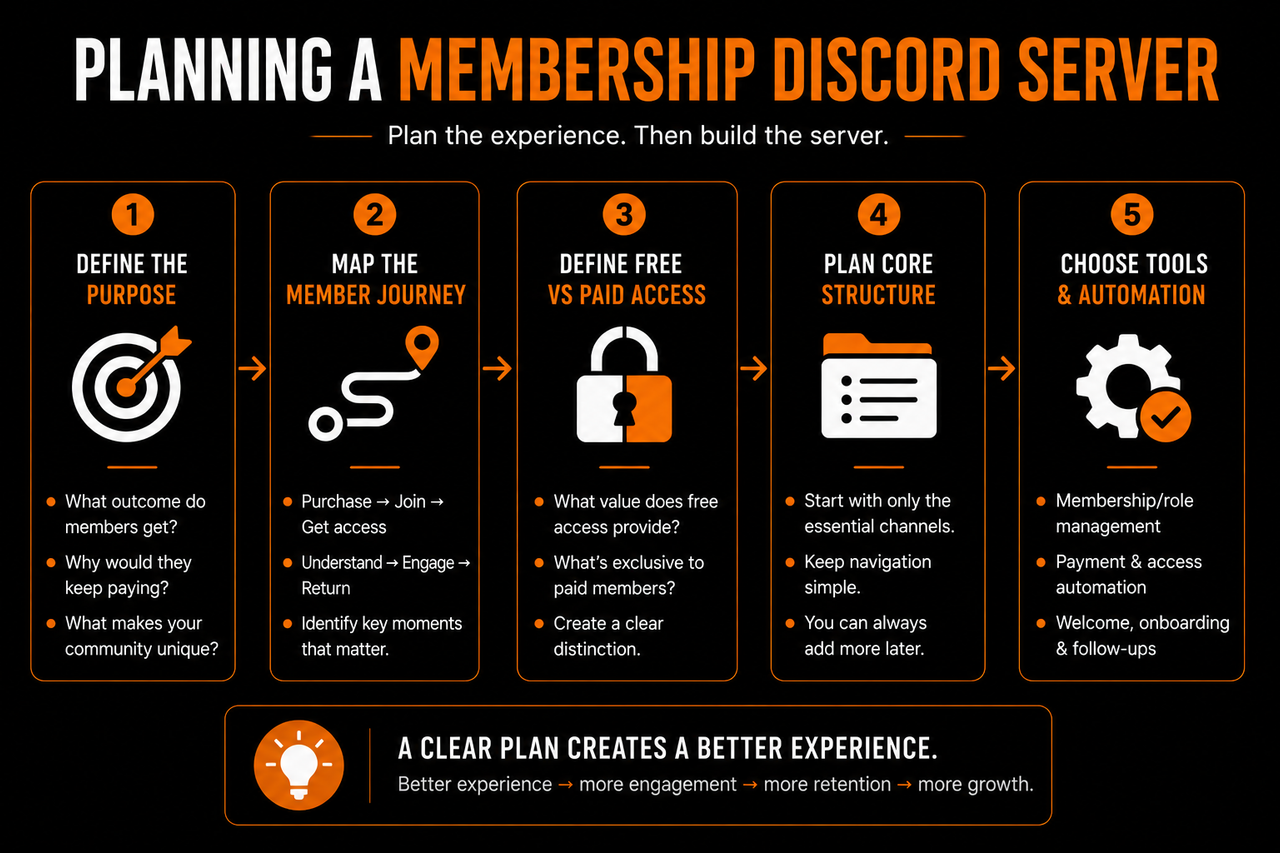
Start With the Reason People Are Paying
A paid membership needs a clear reason to exist.
People are not paying because your Discord server has private channels. They are paying because being inside the community should help them get something they could not get as easily from your public content alone. That outcome will vary depending on the community.
- A coaching community might help members implement what they are learning and receive feedback.
- A creator community might give members access to deeper conversations, exclusive resources, and other people with similar interests.
- An e-commerce community might revolve around strategies, feedback, networking, and shared opportunities.
- A SaaS community might give paying members closer support, education, and access to other users.
Before creating the structure, you should be able to answer:
Why would someone continue paying to remain inside this server?
The answer becomes the foundation for everything else.
- If members are primarily joining for education, your server needs to make learning and finding resources easy.
- If they are joining for networking, member interaction needs to be central.
- If they are joining for coaching, accessing support and receiving feedback should be obvious.
The server should reflect the value being sold.
Map the Member Journey Before the Channels
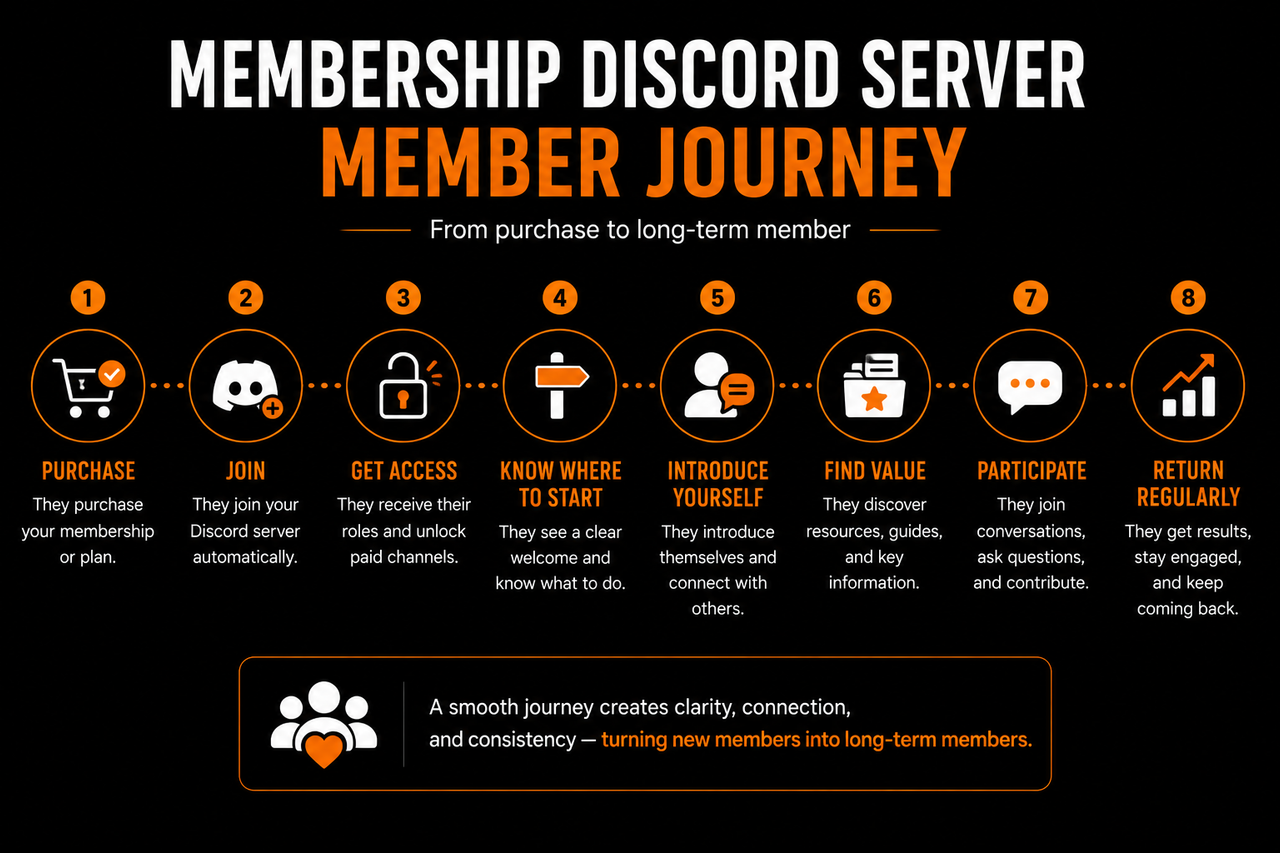
Once the membership has a clear purpose, think about what a member should experience from the moment they purchase access. A simple journey might look like:
Purchase → Join → Get access → Understand where to start → Introduce yourself → Find relevant resources → Participate → Return regularly
That is far more useful as a starting point than a list of channel ideas. Each stage creates a question the server needs to answer.
- How does someone receive access after paying?
- What do they see first?
- How do they know what to do?
- Where do they introduce themselves?
- Where is the core value located?
- How do they discover conversations worth joining?
- What gives them a reason to come back tomorrow?
Once those questions are clear, channels can be created to support them.
For example, you might realize that new members need only three things immediately:
- A clear starting point.
- A place to introduce themselves.
- A direct path toward the main value of the membership.
Everything else can come afterward.
This prevents the server from becoming a collection of channels created because they seemed like good ideas at the time.
Decide What Is Free and What Is Paid
If your Discord server includes both free and paying members, the distinction between those experiences needs to be planned early. A common mistake is creating a large free server and then hiding a few extra channels behind a paid role.
Technically, that creates paid access. But it does not necessarily create a compelling membership.
The paid experience should have a clear purpose beyond simply offering "more Discord."
Think about what the free layer is supposed to accomplish.
It might introduce people to the community, allow them to participate in general discussions, provide selected resources, and give them enough value to understand what the community is about. The paid layer should then provide the deeper experience members are actually subscribing for.That could mean more direct support, specialized discussions, premium resources, live sessions, accountability, networking opportunities, or access to specific expertise.
You do not need to hide everything useful from free members. In fact, a free community that provides no value gives people very little reason to trust that the paid community will be different. The goal is to create a natural distinction:
Free access helps people experience the community. Paid access helps them go further.
Planning that difference before building roles and permissions makes the technical setup much easier later.
Keep the Initial Structure Small
One of the easiest ways to overbuild a membership Discord server is to create a channel for every possible conversation. You might imagine members discussing marketing, sales, tools, wins, questions, strategies, resources, accountability, partnerships, feedback, and ten other topics. So you create a channel for each one. Then the first thirty members arrive.
One person posts in marketing. Two people talk in general. Someone asks a question in support. The other channels sit empty.
Instead of making the community look organized, the structure makes it look inactive. A smaller server concentrates activity. Rather than splitting five conversations across five channels, those conversations can happen in one active space where members actually see each other. You can always create another channel when members demonstrate that they need one It is much harder to make twenty empty channels feel alive.
Start with the channels required to deliver the core experience. Expand when real member behavior gives you a reason to expand.
Plan Roles Around Function, Not Decoration
Roles are another part of Discord that can become unnecessarily complicated. A new membership server rarely needs fifteen different colored roles. Roles should initially solve practical problems. You may need to distinguish:
Staff → Paid members → Free members
If there are genuinely different paid tiers, those may require separate roles too. Beyond that, every additional role should have a reason to exist.
- Perhaps a role gives access to a specific program.
- Perhaps it identifies mentors or moderators.
- Perhaps members select an interest during onboarding so relevant conversations can be surfaced to them.
The important thing is that roles support the experience rather than becoming another layer of complexity members need to understand. Later, roles can also help personalize the community. Different member types may need different resources, channels, or guidance.But that becomes much easier when the basic role structure is clean from the beginning.
Think About the First Five Minutes
Before finishing your plan, imagine you are a member seeing the server for the first time. You have just paid. You click the Discord invite. The server opens.
What happens next?
- Do you immediately know where to go?
- Can you tell which channels matter?
- Is there one obvious starting point, or are there twenty unread channels demanding attention?
- Do you understand what your membership unlocked?
- Can you figure out how to get your first useful interaction?
This is where many membership servers become more complicated than they need to be. Owners build the server from the perspective of someone who already understands it. Members arrive with none of that context.They do not know why one channel exists instead of another. They do not know which resource matters to them. They do not know the community's routines or where people normally talk.
Your structure needs to provide that context.
A member should not need a guided tour of every channel before they can participate.The path toward their first meaningful action should be obvious.
Build for the Community You Have
It is useful to think about scale, but do not design a server for 10,000 members when you currently have fifty. Large communities may eventually need additional moderation, specialized channels, more detailed roles, automated onboarding, and systems for tracking members across different stages. Those problems should be solved when they become relevant.
At the beginning, simplicity gives you something much more valuable: the ability to observe.
- You can see which channels people naturally use.
- You can notice what questions appear repeatedly.
- You can learn what members actually care about.
- You can see where newcomers get confused.
Then the server can evolve around real behavior instead of assumptions.
That is the purpose of planning.
You are not trying to design the final version of your membership Discord server before the first member arrives. You are creating a clear foundation that makes the experience easy to understand and gives the community room to grow.
Once that foundation is clear, the next step is turning the plan into Discord itself: roles, channels, permissions, and the paid access system that determines who can see what.
Roles, Channels, and Paid Access
Once the purpose of the server is clear, the next step is turning that plan into an actual Discord structure.
This is where roles, channels, and permissions come together.
The goal is not to create the most sophisticated server possible. Members should be able to join, receive the correct access, and understand where they belong without needing to learn how your entire Discord setup works. Behind the scenes, your structure can handle different membership levels, staff permissions, and private spaces.
From the member's perspective, it should feel simple.
Start With a Simple Role Structure
Roles determine what different people can do and, more importantly for a membership community, what they can access. A basic server might begin with:
- Admin or Owner for the people running the server.
- Moderator or Team for people helping manage the community.
- Paid Member for active subscribers.
- Free Member if the server includes a free tier.
If your membership has genuinely different plans, you might add separate roles for those tiers. For example:
Free → Member → Premium
Each role can unlock a different level of access.The mistake is creating roles before you know what they are supposed to accomplish.
You probably do not need separate roles for every minor member characteristic. Every additional role creates another permission or organizational decision that someone eventually needs to maintain.
Start with access.
- Who needs to see the paid areas?
- Who can manage conversations?
- Who belongs to the free community?
Once those distinctions work, additional roles can be introduced when they solve a real problem.
Organize Channels Around Member Actions
Channels should make it obvious where important things happen.
A new member does not need ten different categories covering every possible topic. They need a small number of places with clear purposes.
A membership server might begin with a structure such as:
START HERE
#welcome#announcements
COMMUNITY
#general#introductions#wins
MEMBERS
#member-chat#resources#questions
The exact channels depend on the membership.
A trading community may need discussion spaces around markets. A coaching community might prioritize questions and accountability. A creator community could need feedback and collaboration spaces.
The names matter less than the function. When someone wants to ask for help, there should be an obvious place. When they want an important resource, they should know where to look. When the owner makes an announcement, members should not need to search through general conversation to find it.
A good channel structure reduces decisions.
Separate Navigation From Conversation
Not every channel serves the same purpose. Some channels help members understand the server. Others are where they participate in it. Keeping those functions clear can make the server easier to navigate. A welcome or start-here area might contain information members need when they first arrive. These channels usually do not need constant conversation.
The active community area is different.
That is where members ask questions, share progress, talk to each other, and participate regularly. This distinction helps prevent important information from disappearing beneath daily messages. It also means you do not need to explain everything in the welcome section.
The starting area should answer the immediate questions:
Where am I? What should I do first? Where does the actual community happen?
Once members understand that, they can learn the rest by participating.
Use Categories to Make Access Obvious
Discord categories can help separate different parts of the membership without making the server feel complicated. For a free-and-paid community, the structure might be as simple as:
START HERE
Visible to everyone.
COMMUNITY
Visible to free and paid members.
PAID MEMBERS
Visible only to active subscribers.
STAFF
Visible only to the team.
That gives the server a clear hierarchy. Free members can participate in the public community while paid members automatically see the additional spaces their membership unlocks. You can take the same approach with multiple paid tiers, but only when those tiers actually offer different community experiences. If two membership plans unlock exactly the same Discord experience, creating separate categories just because the pricing page has two options may add unnecessary complexity.
Your Discord structure should represent meaningful differences in access.
Paid Access Should Feel Automatic
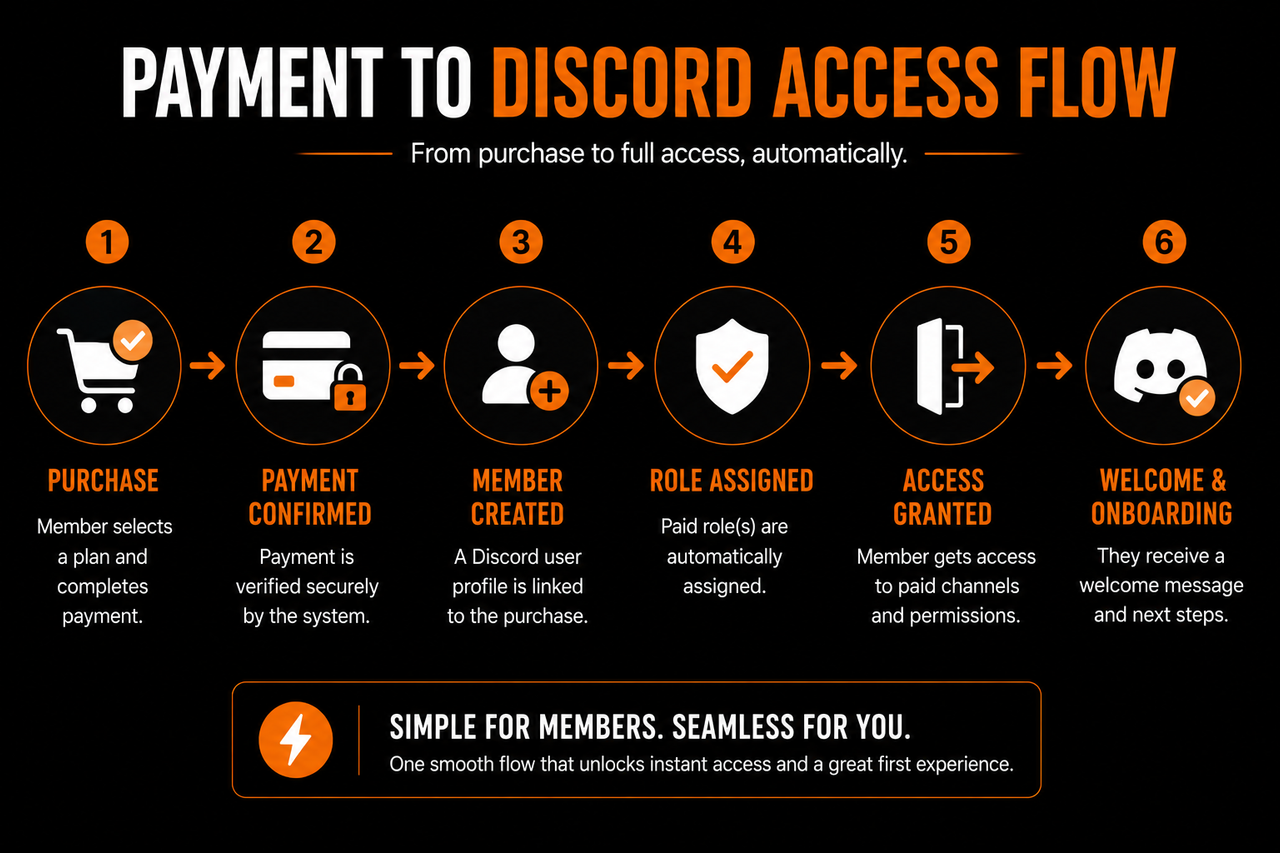
The most important permission change in a membership server happens when someone becomes a paying member. Ideally, the experience is straightforward:
Member purchases → Discord account is connected → Paid role is assigned → Paid areas become available
The member should not need to buy access and then wait for an admin to notice the payment. Manual role assignment can work when the community is tiny. Someone purchases the membership, sends their Discord username, and the owner assigns the role. But that process creates unnecessary work as the community grows.
It can also create a poor first experience.
A member has just decided to pay, which is usually when their interest is highest. Sending them into a waiting period before they can access what they purchased introduces friction at exactly the wrong moment. Automated access makes the transition immediate.
Permissions Should Follow Roles
Once paid access is tied to a role, permissions become much easier to manage. Instead of changing permissions for individual members, you control what the role can access. For example, the general community category might be visible to both free and paid roles. The premium category might be visible only to the paid role. When someone upgrades, assigning that role unlocks the relevant areas.
This also matters when someone cancels. Their paid role can be removed, and the associated paid areas disappear without someone manually changing permissions across individual channels.
That creates a simple rule:
Access follows membership status.
The cleaner that relationship is, the easier the server becomes to manage.
Be careful with exceptions.
Giving individual members custom permissions may solve an immediate problem, but too many exceptions make it difficult to understand why someone can or cannot see something later. Roles should handle most access decisions.
Do Not Hide the Entire Community Behind Permissions
For communities with a free tier, there is a balance between showing the paid experience and protecting what members are paying for.Free members need to understand that a deeper membership exists. But that does not mean they need access to every paid conversation.
The free experience can stand on its own while making the upgrade path clear. Someone might see that paid members receive deeper support, private discussions, exclusive events, or additional resources without being able to access those areas themselves.
What matters is that the difference feels intentional.
Avoid turning the server into a maze of locked channels. Seeing twenty channel names with lock icons does not necessarily make the membership more desirable. It can make the free experience feel like a storefront.
The free community should still feel like a community. The paid tier should feel like the natural deeper layer for people who need what it provides.
Think About What Happens When Membership Changes
Paid access is not only about letting people in. You also need to decide what happens when their status changes.
- Members upgrade.
- Members downgrade.
- Payments fail.
- Subscriptions expire.
- People cancel and later return.
Your role structure should make those changes predictable. If a paid subscription ends, the member does not necessarily need to be removed from the entire server. In a free-and-paid model, they can simply return to free access. That preserves the relationship. They may continue participating, stay connected to people they met, and decide to upgrade again later. This is often better than treating cancellation as the end of the member journey.
The same principle applies to upgrades.
When someone moves into a higher tier, the new experience should become available without requiring them to rejoin the community or figure out another server. The membership changes. Their place in the community continues.
Test the Server as a Member
Before inviting paying members, test the structure from their perspective. Do not only look at the server through your admin account. Administrators can see almost everything, which makes it easy to miss permission problems.
- Check what a free member can see.
- Check what a paid member can see.
- Make sure private staff areas remain private.
- Confirm that paid channels unlock correctly.
- Look at the order of categories and ask whether the important areas are obvious.
Most importantly, make sure the server does not require members to understand your permission system. They should simply receive the right experience. Roles should quietly determine access. Channels should clearly organize the community. Paid membership should unlock the promised value.
When those pieces work together, Discord itself becomes relatively simple for the member.
The next challenge is everything happening behind that structure: payments, membership management, onboarding, automation, and the other tools required to keep the server running without turning every task into manual admin work.
The Tools That Run a Membership Server
A well-structured Discord server gives members the environment they interact with.
But Discord alone does not handle everything required to run a paid membership.
Someone still needs to process payments, connect purchases to Discord accounts, assign the correct roles, remove access when subscriptions end, welcome new members, and keep track of what is happening across the community. When the server is small, many of those tasks can be handled manually.
The problem appears when membership starts growing.
Five manual role assignments are easy. Fifty new members arriving across different days becomes another responsibility someone needs to monitor. Add failed payments, cancellations, upgrades, onboarding questions, and member follow-ups, and community management quickly turns into repetitive admin work.
That is where the rest of the membership stack comes in. The goal is not to install as many tools as possible. It is to automate the predictable tasks so the team can spend more time on the parts of community management that actually require people.
Start With Payments and Membership Management
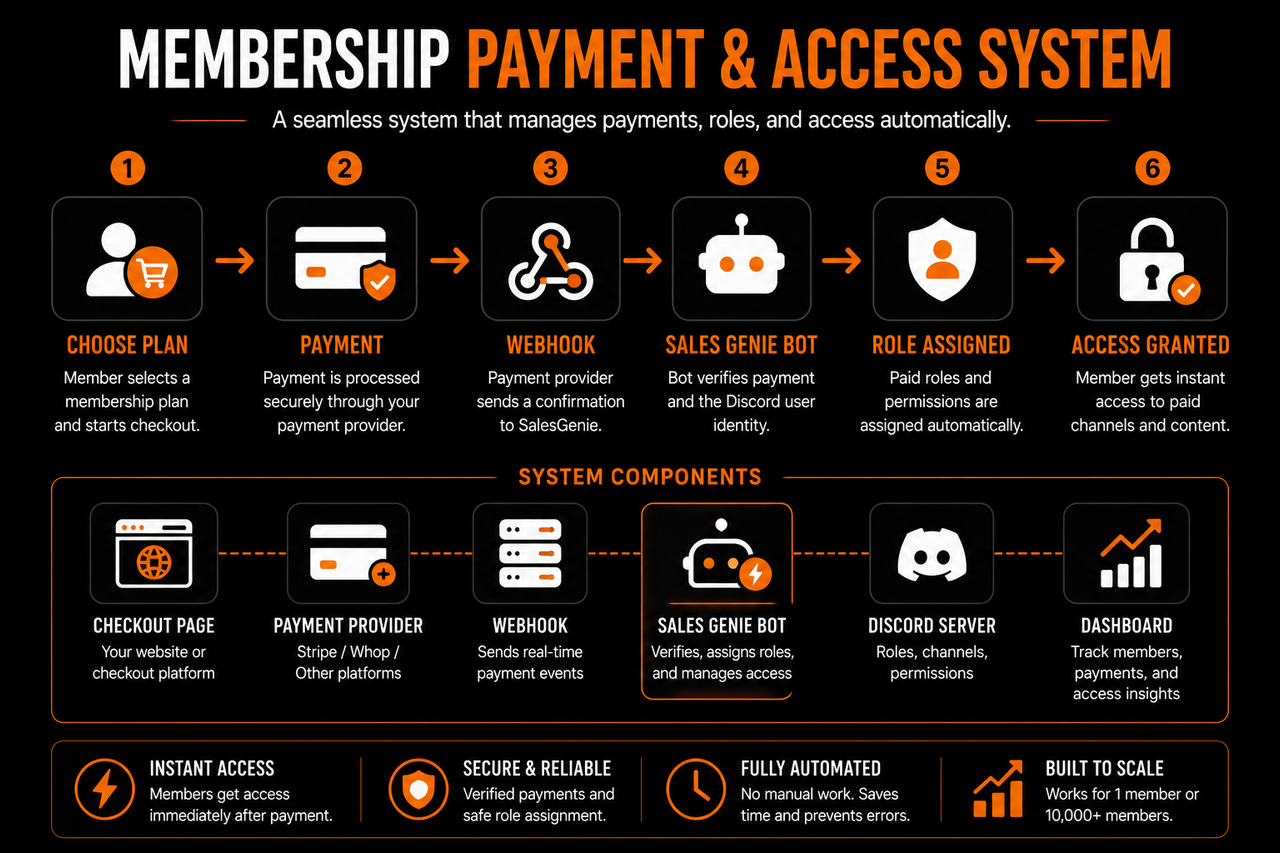
If people are paying for access, you need a system that knows who currently has an active membership. This becomes the source of truth for paid access. At a basic level, the system needs to handle:
- New subscriptions.
- Successful renewals.
- Cancellations.
- Failed or expired payments.
- Upgrades and downgrades.
The important part is connecting those changes to Discord. When someone subscribes, their access should be granted.When their membership changes, their access should change with it. Without that connection, the owner has to compare payment records against Discord roles manually.
That might work when there are twenty members. At two hundred, it becomes easy to miss something.
Someone cancels but keeps premium access for another month. Another member renews after a failed payment but never gets their role back. Someone upgrades but needs to message a moderator before the new channels appear.
Each individual issue is small. Together, they create unnecessary friction for members and unnecessary work for the team. Your payment and membership system should therefore connect directly to the access structure you created in Discord.
Membership status → Discord role → Correct access
Once that relationship is automated, one of the biggest administrative jobs disappears.
Automate the Predictable Parts of Onboarding
Access is only the first step. A new member still needs to understand the community.
Many servers solve this with a welcome message containing several links and instructions. That is better than providing no direction, but onboarding can go further.
The first few interactions can help members understand where they belong and help the community understand who just joined. For example, onboarding might collect basic context such as:
- Why they joined.
- What they are trying to accomplish.
- Their current experience level.
- Which part of the membership is most relevant to them.
That information can then influence what happens next. Someone completely new to the topic may need a starting resource. An experienced member might benefit more from an advanced discussion or networking opportunity. A member who joined for feedback should quickly discover where feedback happens.
This makes onboarding less about giving every member the same tour and more about helping each person reach something useful.
Automation can handle the repetitive part of that process.
The community team does not need to manually ask every new member the same introductory questions. Instead, the system can collect the basics and make the resulting context available when a human interaction becomes useful.
Bots Should Solve Specific Problems
Discord bots can do almost anything. That makes it tempting to add one whenever you discover a new feature. One handles moderation. Another welcomes members. Another creates tickets. Another manages roles. Another runs polls. Another tracks activity. Another posts notifications.
Soon, the server has more bots than active conversations.
A better approach is to start with the problem.
Ask:
What task are we currently doing manually that should not require manual work?
- Maybe members are waiting for role assignments.
- Maybe the same onboarding questions are answered every day.
- Maybe moderators repeatedly remove spam.
- Maybe event reminders need to be posted manually.
Those are specific problems.
Choose tools around them.
A bot that saves the team hours each week is useful. A bot that adds fifteen commands nobody uses is not. This also keeps the member experience cleaner. Members should not need to learn six different bot systems just to participate in a community.
Most automation should happen quietly in the background.
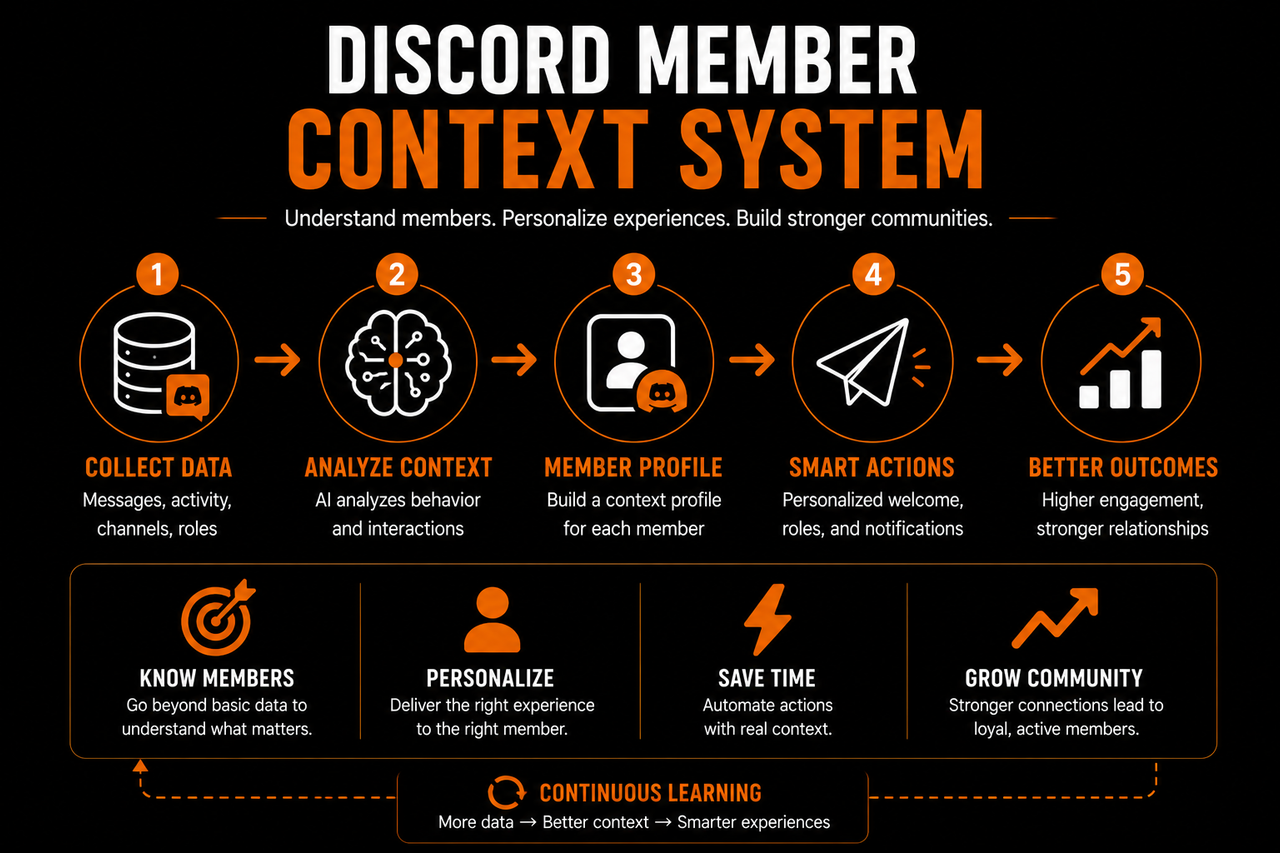
You Need Somewhere to Keep Member Context
As the community grows, another problem appears. Discord remembers conversations, but it does not necessarily make the member journey easy to understand.
Suppose someone joined three months ago. They completed onboarding, mentioned what they were working on, asked a few questions, became active for several weeks, and then disappeared. All of that may still exist somewhere in Discord. But reconstructing the story means searching through messages, channels, threads, and possibly private conversations.
Now repeat that for hundreds of members.
This is where some communities begin using spreadsheets.
A spreadsheet might track a username, join date, membership tier, onboarding status, and a few notes. That is useful at first. But it still relies on someone remembering to update it.
As more conversations happen, the spreadsheet becomes a second version of the community that the team has to maintain manually. A community CRM or member management system solves a different problem. Instead of only asking:
What is happening in the server?
you can begin asking:
What has happened with this member?
The member becomes the organizing point. Their onboarding information, membership status, relevant conversations, interests, and follow-up context can form one ongoing picture. That becomes particularly useful when multiple people help run the community. A moderator does not need to rely entirely on another team member's memory to understand what happened previously. The context can continue with the member.
Automation Should Support Relationships
There is a risk when automating a community: making everything feel automated. That is not the goal. Members join communities because there are people inside them.
A perfectly automated welcome sequence cannot replace a useful conversation. Automatically assigning roles does not create belonging. Tracking engagement does not make someone feel noticed. Automation should handle the tasks that prevent the team from doing those things.
Consider two approaches to a new member.
In the first, an admin manually checks the payment, assigns a role, sends the invite instructions, copies a welcome message, and records the member in a spreadsheet. By the time all of that is finished, most of the admin's effort has gone into administration.
In the second, payment and access happen automatically. Onboarding collects the basic context. The member profile is created without someone copying information between systems.
Now the admin can spend their time saying:
I saw you're working on your first offer. There are a few people here doing something similar. Let me point you toward the right discussion.
The automation did not replace the relationship. It created room for it. That distinction matters when choosing tools for a membership community. The best systems are often the ones members barely notice.
Avoid Building a Complicated Tech Stack Too Early
Just as you can overbuild the Discord server, you can overbuild the technology behind it. A new membership does not need enterprise-level infrastructure. At the beginning, the essential stack is relatively simple:
A way to collect payment. A way to control Discord access. A way to onboard members. A way to manage the community.
Additional systems should be introduced when the existing process begins creating a real limitation. Maybe member information becomes difficult to track.Maybe the team needs better moderation. Maybe events become central to the membership. Maybe support requests need a structured workflow.
At that point, another tool may make sense.
Starting small has another advantage: you learn how the community actually operates before automating it. Automating a bad process only makes the bad process happen faster. Run the community long enough to understand what members need, which tasks repeat, and where the team loses time. Then automate those parts.
The Stack Should Make the Community Easier to Run
A good membership stack should reduce the amount of attention required to keep the basic operation working. New members can pay and receive access without waiting. Their first steps are clear. Membership changes are reflected in their roles. Important member context is not dependent on someone's memory. Routine tasks happen consistently. The community team can then focus on conversations, events, support, content, relationships, and improving the experience.
That is the real purpose of the tools behind a membership Discord server. They are not there to make the server look sophisticated. They are there to make growth manageable.Once the structure and systems are working together, the server is technically ready.
The final step is bringing members into it without treating launch day as the finish line.
Launching It to Members
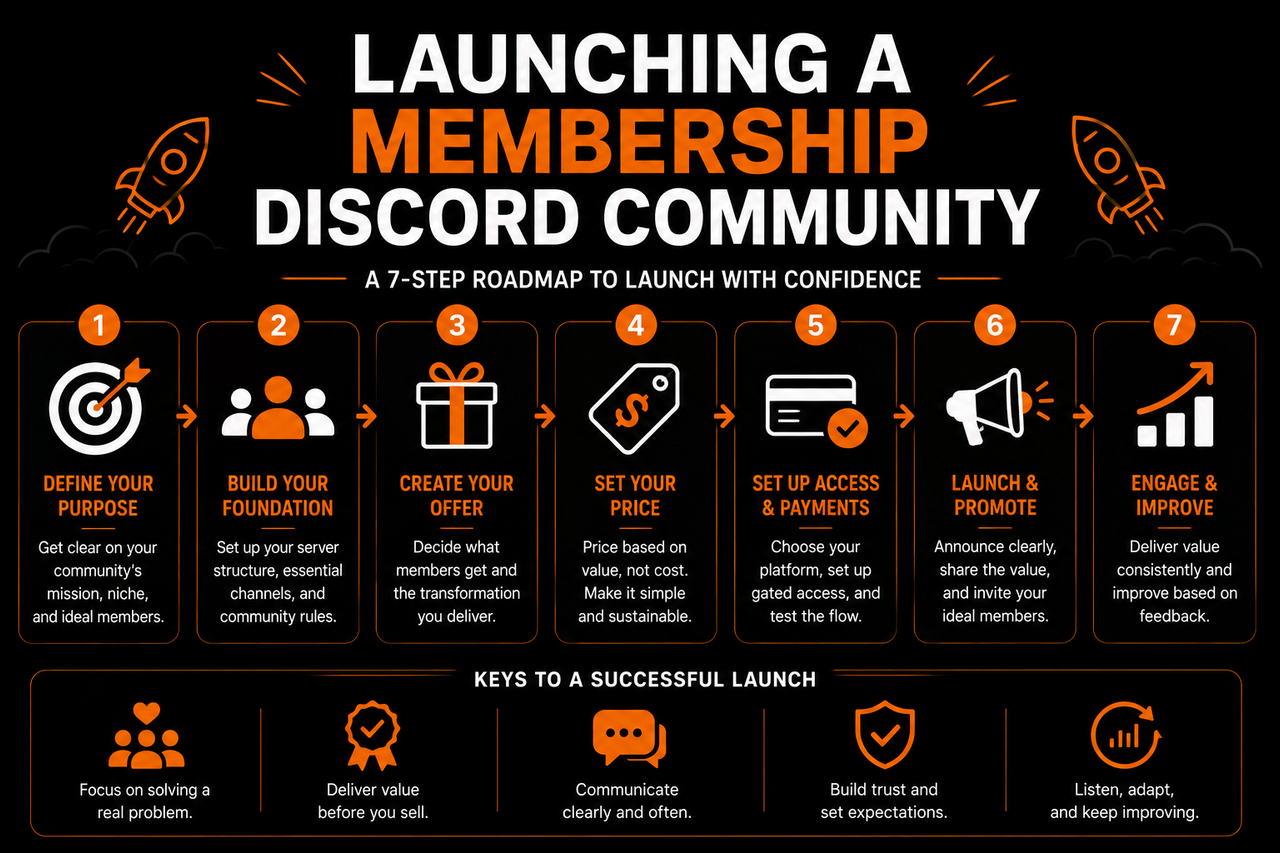
Once the server structure, paid access, and basic systems are working, you are ready to start bringing members in. But launching a membership Discord server does not need to feel like opening the doors to a finished product.
Your first version should be functional, clear, and useful. It does not need to anticipate everything the community might need six months from now.
Test the Full Journey Before Launch
Before sending invites, go through the process exactly as a new member would. Start from the point where someone decides to join.
- Can they purchase the membership without confusion?
- Does their Discord access activate correctly?
- Do they receive the right role?
- Can they immediately tell where to start?
- Does the first message explain what they should do next?
Then test the less obvious situations.
- What happens when someone cancels?
- What happens when a payment fails?
- What happens when a member upgrades?
- What does a free member see compared with a paid member?
These small tests can prevent frustrating problems once real members start arriving. You do not need every future workflow figured out. You need the core journey to work reliably:
Join → Get access → Know where to start → Reach the value
If that works, you have enough to launch.
Give the First Members a Clear Starting Point
Do not invite members and expect them to figure out how the community should work. The first members have no existing activity to learn from. There are no established routines. Nobody knows which conversations normally happen where. Give them something specific to do. Ask them to introduce themselves. Point them toward the most useful resource. Start a discussion around a problem members are likely facing. Schedule the first live session. Encourage people to share what they are currently working on.
Early activity creates examples for the next members who arrive. Instead of joining an empty server and wondering what they are supposed to do, newcomers see people already participating.
Do Not Launch With Empty Complexity
This is another reason to keep the initial server small. Ten active members talking in a few channels can feel like the beginning of a real community. The same ten members spread across thirty channels can make the server look abandoned. You can create new spaces as conversations grow.
- If one topic repeatedly dominates the main discussion, give it a dedicated channel.
- If members begin sharing resources frequently, organize those resources properly.
- If events become an important part of the membership, create a clearer area for them.
Let member behavior tell you when the structure needs to expand. The server you launch should be a starting point, not a prediction of every feature the community will eventually need.
Watch Where Members Get Stuck
The first members will show you problems you could not see while building the server. Maybe people keep asking where a particular resource is. Maybe nobody uses a channel you thought would be important. Maybe new members receive access correctly but do not know what to do afterward. Maybe everyone asks the same onboarding question.
Those are useful signals.
Do not immediately respond by adding more channels, bots, and instructions. First ask whether the existing experience can simply be clearer.A confusing welcome message may need rewriting. Two overlapping channels may need combining. An important resource may need to appear earlier in onboarding. A repetitive manual task may finally be worth automating. Your initial members are effectively testing the system with real behavior.
Use that behavior to improve it.
Build the Server Around What Members Actually Use
A membership Discord server is never really finished. The community changes as new members arrive, conversations develop, and the membership itself evolves. The structure should evolve with it. That does not mean constantly redesigning the server.
It means paying attention. Keep the spaces members use. Improve the processes that repeatedly create friction. Remove things that no longer serve a purpose. Add complexity only when that complexity solves a problem.
The same principle applies to the tools behind the server.
Payments, roles, onboarding, automation, and member management should make the experience easier to run without becoming the experience itself.Members ultimately care about what happens after they join. They care about the people they meet, the support they receive, the conversations they have, and whether the membership helps them achieve what they came for.
Discord provides the space. Your systems keep that space organized. But the community is what makes the membership worth paying for. A strong membership Discord server therefore does not start with dozens of channels or complicated automation.
It starts with a clear purpose, a simple member journey, and a structure built around delivering the value you promised. Get those foundations right.
Then let the server grow with the community.