

How to Structure a Paid Discord Server
Creating a paid Discord server is relatively easy.
Creating one that members actually enjoy using is much harder.
Many community owners spend weeks setting up bots, designing graphics, creating dozens of channels, and fine-tuning permissions before inviting their first member. By launch day, the server looks impressive—but it doesn't necessarily feel usable.
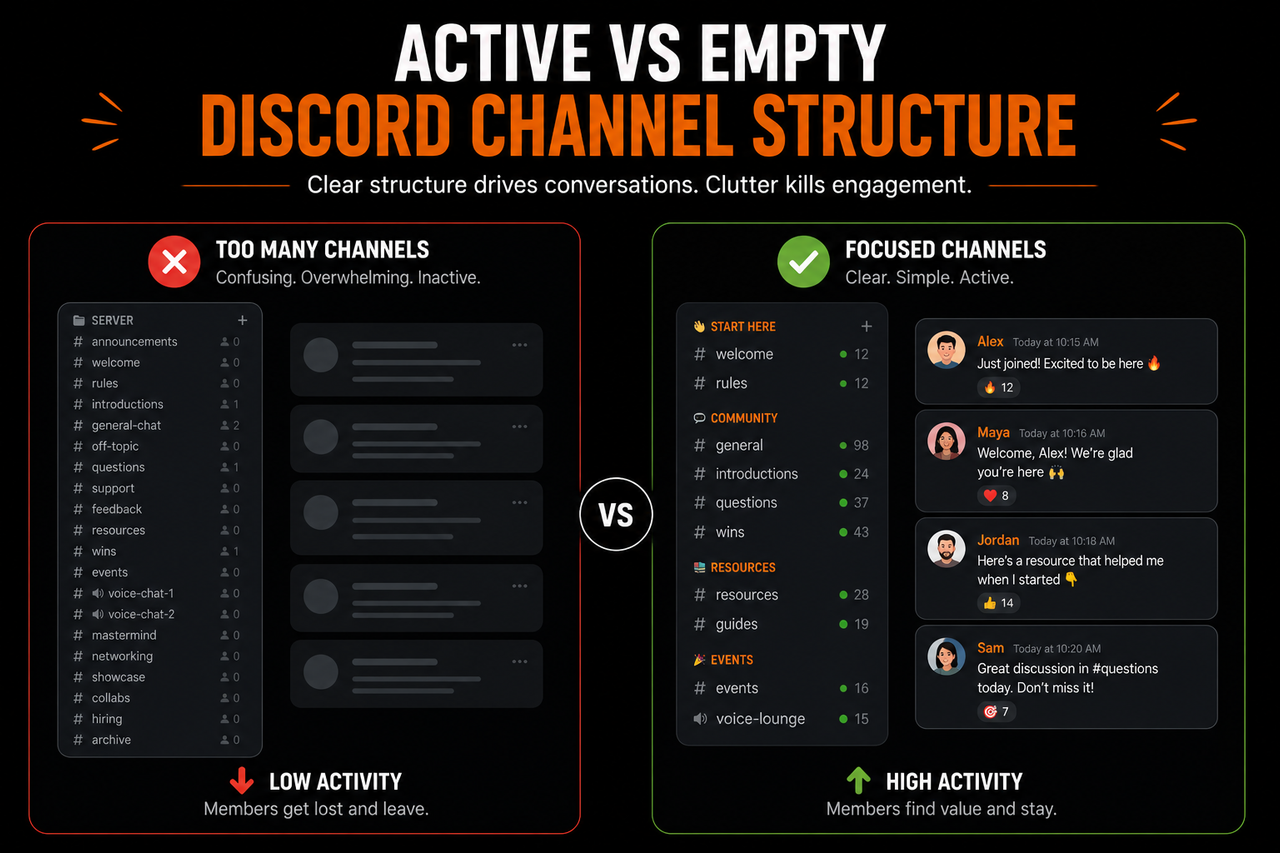
A new member joins and is immediately greeted by thirty or forty channels.
- Announcements.
- Rules.
- Introductions.
- Resources.
- General chat.
- Voice rooms.
- Off-topic discussions.
- Feedback.
- Wins.
- Questions.
- Support.
- Events.
- Archives.
Each channel may have a purpose, but to someone joining for the first time, they all look equally important. Instead of feeling excited, new members often feel overwhelmed.
- They don't know where to begin.
- They aren't sure which conversations matter.
- They're hesitant to ask questions because everyone else already seems settled in.
Within a few minutes, many leave Discord with the intention of "coming back later."
Unfortunately, later often never comes.
This is why server structure matters far more than most people realize.
A Discord server isn't simply a collection of channels. It's the environment where members experience your community.
A well-structured server quietly guides people from one step to the next.
- It makes navigation feel effortless.
- It helps members find value quickly.
- As your community grows, it prevents the server from becoming confusing or difficult to manage.
The goal isn't to build the biggest Discord server.
It's to build one that makes the member journey obvious.
Why Server Structure Drives Engagement
Most people think engagement begins with conversations.
In reality, engagement begins much earlier. It begins the moment a member opens your server for the first time.
- Before they send a message.
- Before they attend an event.
- Before they meet another member.
They're already making decisions. They're deciding:
- Whether this community feels organized.
- Whether they understand what's happening.
- Whether they can see where to start.
- Whether joining was the right decision.
These first impressions happen surprisingly quickly. Within the first few minutes, members are subconsciously asking themselves questions like:
- Where should I go first?
- Which channels actually matter?
- Is this community active?
- Will I fit in here?
- How do people normally participate?
If the server answers those questions naturally, members continue exploring.
If it doesn't, uncertainty begins replacing curiosity.
Structure Creates Confidence
Imagine entering two different libraries.
The first has clearly labeled sections. Books are organized logically. Signs point you toward exactly what you're looking for. Even if you've never visited before, you immediately feel comfortable navigating the space.
Now imagine another library where every shelf is randomly arranged. Nothing is categorized. Important books sit beside unrelated topics. There are no signs. Finding anything requires asking someone for help.
Both libraries may contain the same information.
The experience feels completely different.
Discord servers work the same way. Good structure reduces mental effort. Members spend less time figuring out how the server works and more time participating in it.
That confidence is especially important in paid communities. People have invested money to join. They expect a professional experience.
If they immediately feel lost, the perceived value of the membership drops before they've experienced any of the actual community.
Navigation Should Feel Obvious
One of the most common mistakes community owners make is designing their server from the perspective of an administrator.
- They know every channel.
- They know why each category exists.
- They remember why a certain resource was placed in a particular location.
New members don't have that context. They're seeing everything for the first time.
That means navigation should feel almost self-explanatory. When someone joins, they shouldn't need to think:
"Where am I supposed to go?"
The server itself should answer that question.
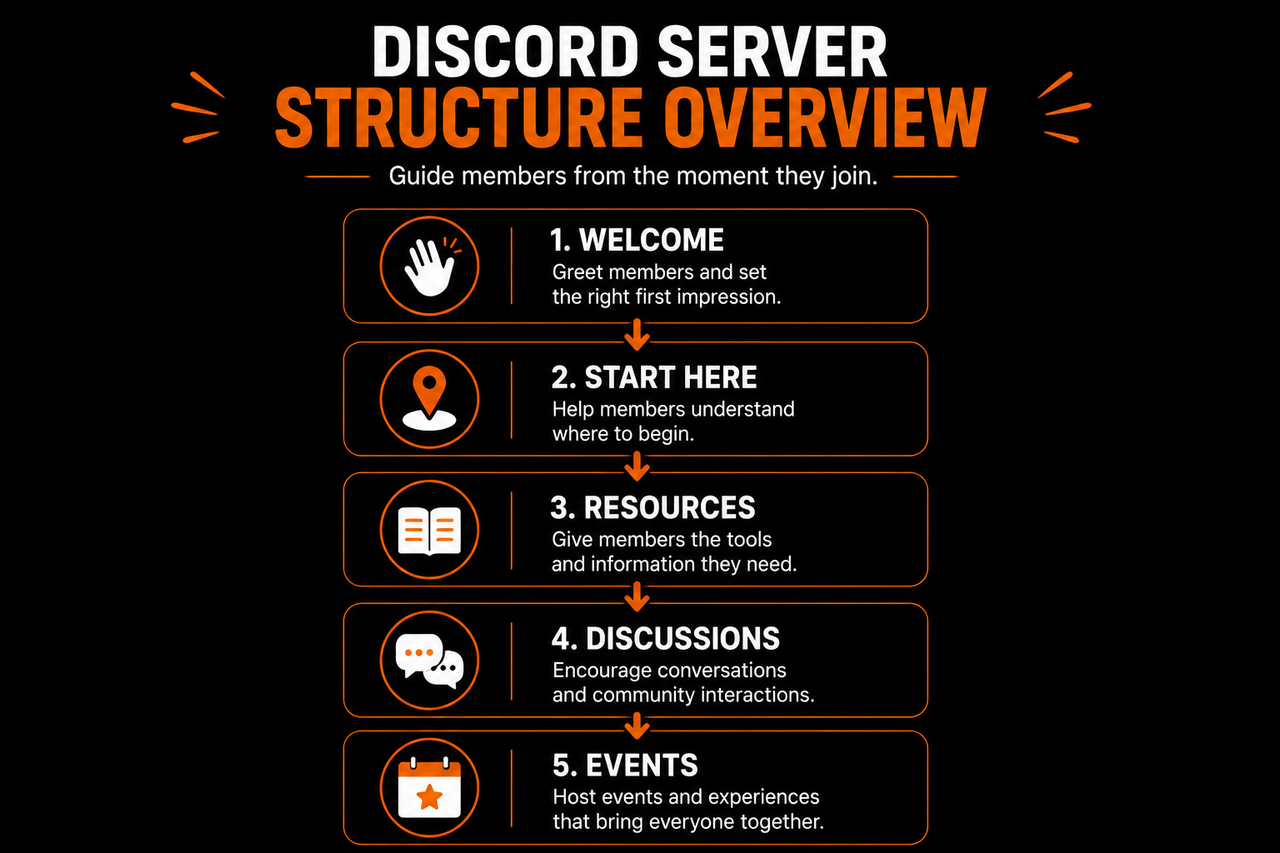
A simple progression often works best:
- Welcome.
- Understand the community.
- Introduce yourself.
- Access key resources.
- Join conversations.
- Attend events.
The member doesn't consciously notice this progression. They simply move through it naturally.
That's exactly what good structure should accomplish.
Every Channel Should Have a Job
Another common issue is creating channels "just in case." A community launches with:
- A podcast discussion channel.
- A mastermind channel.
- A networking space.
- A showcase channel.
- A hiring board.
- A collaboration channel.
- Three different feedback channels.
- Five voice rooms.
Months later, most of them remain inactive. Instead of making the community appear larger, empty channels create the opposite impression. They suggest that conversations aren't happening.
Before creating any new channel, ask one question:
What specific purpose does this channel serve?
If the answer isn't immediately obvious, the channel probably isn't necessary yet.
Good servers don't have more channels.
They have clearer ones.
Organize Around Member Actions
Many Discord servers are organized around topics. While that can work, organizing around member actions often creates a smoother experience.
Think about what members are trying to accomplish. They're trying to:
- Learn something.
- Ask questions.
- Meet people.
- Access resources.
- Share progress.
- Participate in discussions.
Those actions naturally suggest how the server should be organized.
Instead of asking:
"What categories should I create?"
Ask:
"What is the member trying to do at this point?"
The answer often produces a much more intuitive structure.
Remove Decisions Wherever Possible
Every additional decision slows members down.
Imagine joining a server with twenty discussion channels. Even if every channel is useful, choosing where to post becomes surprisingly difficult. People hesitate because they don't want to post in the wrong place.
Some decide not to post at all.
The same thing happens with resources. If members are presented with dozens of documents immediately, they don't necessarily feel informed.
They often feel overwhelmed.
Reducing unnecessary choices creates clarity.
- Rather than giving members ten possible starting points, give them one.
- Rather than highlighting every resource, recommend the most important one.
- Rather than expecting members to understand your server immediately, guide them step by step.
Small moments of clarity compound into a much better overall experience.
Structure Should Reflect the Member Journey
One of the easiest ways to evaluate your server is to imagine joining it for the first time.
Open Discord. Ignore everything you already know.
Now ask yourself:
- What would I click first?
- Would I know where to introduce myself?
- Could I easily find important resources?
- Would I understand how conversations usually happen?
- Would I know how to get help?
If the answer to those questions is yes, your structure is probably doing its job.
If not, the solution usually isn't adding another channel.
It's simplifying the journey.
Ultimately, a well-structured Discord server doesn't just organize information.
It guides members toward participation.
The next step is deciding what that journey actually looks like by creating a channel layout that naturally leads members from joining the server to becoming active participants.
A Channel Layout That Guides Members
Once you understand why server structure matters, the next question becomes much more practical:
How should the server actually be organized?
There isn't one perfect layout that works for every paid community. A coaching community has different needs than a gaming community. A networking group operates differently from a course-based membership.
However, almost every successful paid Discord server follows the same underlying principle:
The layout should guide members through a journey.
Instead of presenting every channel equally, the server should naturally lead members from one stage to the next.
The best layouts feel almost invisible. Members instinctively know where to go because the structure quietly guides their decisions.
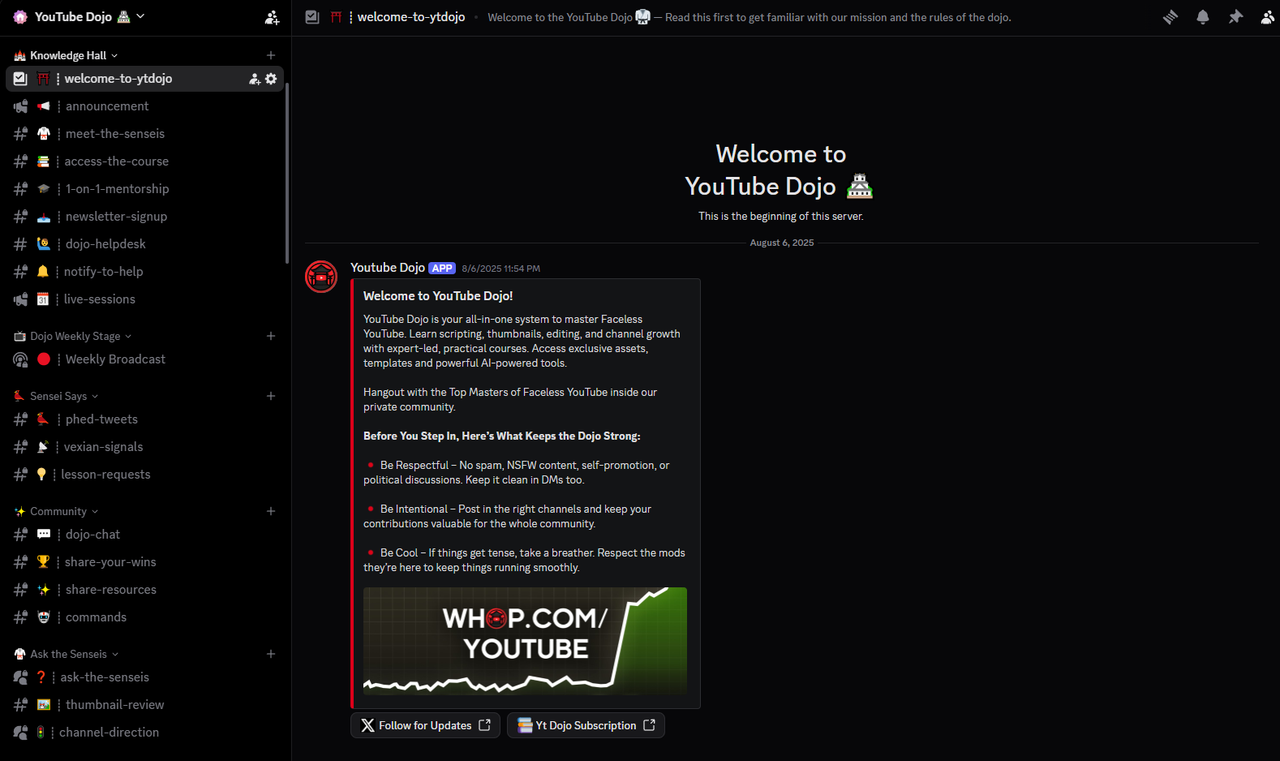
Start With a Clear Welcome Area
The first category every member encounters should help them understand the community—not overwhelm them.
This area typically contains only the essentials. For example:
- Welcome
- Community Rules
- Start Here
- Announcements
That's it.
Notice what isn't here.
- There aren't fifteen resource channels.
- There aren't dozens of discussion spaces.
- There aren't complicated role-selection menus.
The objective of the welcome area is simply to answer three questions:
- Where am I?
- What should I do first?
- What happens next?
If members can answer those questions within a minute or two, the onboarding experience immediately feels more approachable.
Keep Important Information Easy to Find
One of the biggest frustrations inside growing communities is searching for information that should have been easy to locate.
Someone asks:
"When is the next community call?"
Five people answer.
The same question appears again three days later.
The problem usually isn't the members.
It's that important information has become buried beneath conversations.
Instead of allowing announcements, schedules, guides, and resources to disappear inside active discussion channels, give them a dedicated place. For example, one small category might contain:
- Announcements
- Events
- Resources
Members quickly learn:
"If I need official information, this is where I look."
That consistency dramatically reduces confusion as the community grows.
Separate Information From Conversation
Many communities unintentionally mix permanent information with ongoing discussion.
Imagine a resources channel where educational guides are constantly interrupted by casual conversations. Within a few days, the resources become difficult to find.
Likewise, imagine announcements being followed by dozens of replies. Important updates quickly disappear beneath reactions and conversations.
A simple principle solves this problem:
Information should remain easy to reference.
Conversations should remain easy to participate in.
Keeping those purposes separate creates a cleaner experience for everyone.
Members always know where to learn.
They always know where to talk.
The two don't compete for attention.
Create Discussion Spaces Around Purpose
One mistake many owners make is creating highly specific discussion channels immediately. Examples include:
- SEO Questions
- Facebook Ads
- Copywriting
- Funnels
- Email Marketing
- Cold Outreach
- Sales Calls
- AI Tools
While each topic may be relevant, splitting conversations too early often produces dozens of half-active channels.
Instead, begin broader. A small number of active discussion spaces almost always feels healthier than dozens of quiet ones.
For many communities, something as simple as:
- General Discussion
- Questions & Help
- Wins & Progress
is enough during the early stages.
As participation naturally increases, conversations begin clustering around specific themes. Those recurring themes become good candidates for dedicated channels.
In other words, let activity justify expansion.
Don't expand in anticipation of activity.
Make Resources Easy to Explore
Resources are often one of the biggest reasons members join a paid community.
- Templates.
- Guides.
- Recordings.
- Downloads.
- Recommended tools.
- Frameworks.
However, placing hundreds of resources into one category doesn't necessarily increase their value. In fact, it often has the opposite effect.
Members don't know where to begin.
A better approach is to highlight the resources most members need first. Think about the first week after someone joins. What three or four resources would help them succeed fastest?
Start there.
Once members become comfortable navigating the community, they'll naturally explore the deeper resource library. This keeps the experience approachable without limiting access.
Events Should Feel Like Part of the Community
If your membership includes live sessions, workshops, office hours, networking calls, or community events, they deserve their own visible place inside the server. Members shouldn't have to search through general chat to discover what is happening next week.
A dedicated events space allows people to quickly answer questions like:
- What's happening this week?
- How do I join?
- Where are previous recordings?
- What should I attend next?
When events are easy to find, participation generally increases because members don't need reminders every time something is scheduled.
Private Areas Should Have a Clear Purpose
Many paid communities include private spaces. These might be:
- Staff discussions.
- Moderator coordination.
- Mentor channels.
- VIP memberships.
- Coaching groups.
- Accountability groups.
Private spaces work best when they provide a genuinely different experience rather than simply hiding conversations behind another role.
For example, a coaching channel might exist because members receive personalized feedback. A mastermind group might remain private because discussions involve business-sensitive information.
The purpose should always be obvious. If members can immediately understand why a particular area exists, the server feels intentional rather than fragmented.
Resist the Urge to Build for Tomorrow
A surprisingly common mistake is designing a server for the community you hope to have next year. Owners create categories for:
- Future masterminds.
- Future networking.
- Future regional groups.
- Future advanced courses.
- Future language communities.
Most remain empty.
Members don't judge a server by its potential.
They judge it by what exists today.
An active server with twelve well-designed channels almost always feels stronger than a server with fifty channels where only six contain regular conversations.
Build for your current community. Expand when existing channels consistently become busy enough to justify additional organization.
Growth should simplify navigation, not complicate it.
Think Like a First-Time Member
One of the easiest ways to evaluate your layout is to temporarily forget everything you know about your own server.
Imagine receiving an invitation today. You know nothing about the community, nothing about its culture, and nothing about its structure.
Ask yourself:
- Would I immediately know where to begin?
- Could I find important information without asking someone?
- Would I know where to introduce myself?
- Is it obvious where questions belong?
- Could I identify the community's most valuable resources?
If those answers are clear, your layout is probably serving members well.
If not, the solution is rarely adding another category.
More often, it involves simplifying the existing one.
A well-designed channel structure should quietly remove uncertainty from the member experience.
But even with the perfect layout, another challenge eventually appears. As communities grow, activity naturally spreads across more conversations, making some areas appear quieter than others.
The goal isn't to fill every channel with messages.
It's to structure the community in a way that prevents it from feeling empty while keeping conversations concentrated where members are most likely to participate.
Keeping It From Feeling Dead
One of the biggest fears community owners have is opening Discord and seeing silence.
A few conversations happened yesterday. Someone reacted to an announcement this morning. Beyond that, not much appears to be happening. The immediate reaction is usually:
"We need more channels."
Or:
"We need more members."
In reality, neither is usually the solution.
A community rarely feels alive because it has more places to talk. It feels alive because members know where conversations happen. The goal isn't to create activity everywhere. The goal is to concentrate activity where people naturally expect it.
Empty Channels Create the Wrong Impression
Imagine walking into a restaurant with fifty tables.
Only four are occupied. Even if those four tables are having wonderful conversations, the restaurant feels empty.
Now imagine a smaller restaurant with twelve tables.
Ten of them are occupied. The atmosphere feels completely different. Discord servers work in much the same way.
When conversations are spread across too many channels, every channel looks quiet. Members hesitate to post because it appears nobody is there. Instead of encouraging participation, additional channels often reduce it. This is why smaller, busier channel structures generally outperform large, fragmented ones.
People naturally gravitate toward places where conversations are already happening.
Consolidate Before Expanding
A common mistake is creating a new channel every time a new topic appears.
- Someone asks about AI. An AI channel is created.
- Someone mentions freelancing. Now there's a freelancing channel.
- Another member talks about productivity. Soon there's a productivity channel too.
After several months, the server contains thirty discussion channels, each receiving one or two messages every few days.
A healthier approach is to consolidate conversations until activity naturally demands expansion. For example, one active Questions & Discussion channel often generates significantly more participation than five nearly empty topic-specific channels.
When discussions around a particular subject become frequent enough that they consistently interrupt other conversations, then it's probably time for a dedicated space.
Growth should be driven by community behavior, not by assumptions.
Make General Channels the Center of Activity
Every healthy Discord community usually has one place where members naturally gather.
It may be called:
- General Chat
- Community Chat
- Lounge
- Discussion
The name matters very little. The purpose matters enormously. This becomes the heartbeat of the server. New members quickly learn:
"If I want to participate, this is where people are."
Having one consistently active discussion space lowers the barrier to participation. Members don't need to decide between ten different places to post. They simply join the conversation.
Ironically, reducing options often increases activity.
Don't Archive Conversations Too Quickly
Some owners worry that active discussion channels become messy over time. Their solution is often to create new channels every few weeks or archive older discussions aggressively. That usually hurts more than it helps. Communities benefit from continuity.
Members enjoy returning to familiar spaces. They recognize recurring participants. Ongoing conversations build naturally because everyone knows where discussions normally happen. Unless a channel has clearly outgrown its purpose, there is rarely a need to split or archive it simply for organizational reasons.
Consistency helps people develop habits. And habits are what keep communities active.
Use Events to Bring Members Together
Even highly active communities experience quieter periods.
People become busy. Projects demand attention. Seasonal changes affect participation. Rather than trying to force daily conversation, successful communities create regular moments where members naturally come together.
Examples include:
- Weekly Q&A sessions.
- Community calls.
- Office hours.
- Networking events.
- Member showcases.
- Monthly challenges.
These events create predictable activity. Members know something worthwhile is happening, and conversations often continue long after the event has ended. The goal isn't simply to fill a calendar. It's to create recurring reasons for people to return.
Encourage Conversations Members Can Join Easily
Some discussions naturally attract participation. Others unintentionally discourage it. For example:
"Share one thing you accomplished this week."
is much easier to answer than:
"Write a detailed case study about your business journey."
Small prompts lower the effort required to participate.
- Wins.
- Questions.
- Polls.
- Opinions.
- Recommendations.
Simple discussion starters often generate surprisingly healthy conversations because almost everyone feels comfortable contributing. The easier it is to join a discussion, the more likely members are to become regular participants.
Activity Should Be Visible
Members often decide whether a community is active within seconds of joining. They don't analyze engagement statistics.
They simply look around.
- Can they see recent conversations?
- Do people respond to one another?
- Are announcements current?
- Do events appear to be happening?
Visible activity builds confidence.
This doesn't mean forcing conversations or sending announcements simply to make channels appear busy. It means ensuring the parts of the community where activity naturally belongs remain easy to discover. If your most valuable conversations are hidden across dozens of channels, new members may incorrectly assume the community is inactive.
Good structure makes healthy activity obvious.
Resist the Temptation to Fill Every Space
A common misconception is that every channel should receive daily messages. That isn't realistic. Some channels naturally serve as references.
- Resources.
- Announcements.
- Guides.
- FAQs.
Members visit these when needed. They aren't supposed to generate constant discussion. Trying to force activity into every channel often produces low-quality conversations that feel artificial. Instead, judge each channel by whether it fulfills its purpose.
- Discussion channels should encourage discussion.
- Resource channels should make information easy to find.
- Announcement channels should communicate important updates.
Not every space needs to look equally busy.
A Community Feels Alive When Members Know Where to Go
Ultimately, people don't perceive activity by counting messages. They perceive it by how easy it is to become part of ongoing conversations.
A server with fifteen active members can feel incredibly vibrant if everyone knows where discussions happen.
Another server with five hundred members can feel deserted if conversations are scattered across dozens of quiet channels.
Good structure concentrates participation instead of dividing it. Members feel comfortable joining discussions because those discussions are visible, welcoming, and easy to find. As your community continues growing, however, even a well-organized server will eventually need to evolve.
The challenge is expanding the structure without recreating the clutter and confusion you worked so hard to avoid. That requires thinking about server organization not just for today's members, but for the community you will have six months or a year from now.
Structuring for Growth
One of the biggest mistakes community owners make is assuming the server they launch will be the server they use forever. Communities are living systems.
The conversations change. Member interests evolve. New programs are introduced. Events become more frequent. Moderators join the team.
The server that worked perfectly with fifty members will eventually begin showing signs of strain as the community grows. That does not mean the original structure was wrong. It simply means the community has reached a new stage.
Good server structure is not static. It evolves alongside the people using it. The challenge is making those changes without turning a familiar community into a confusing one.
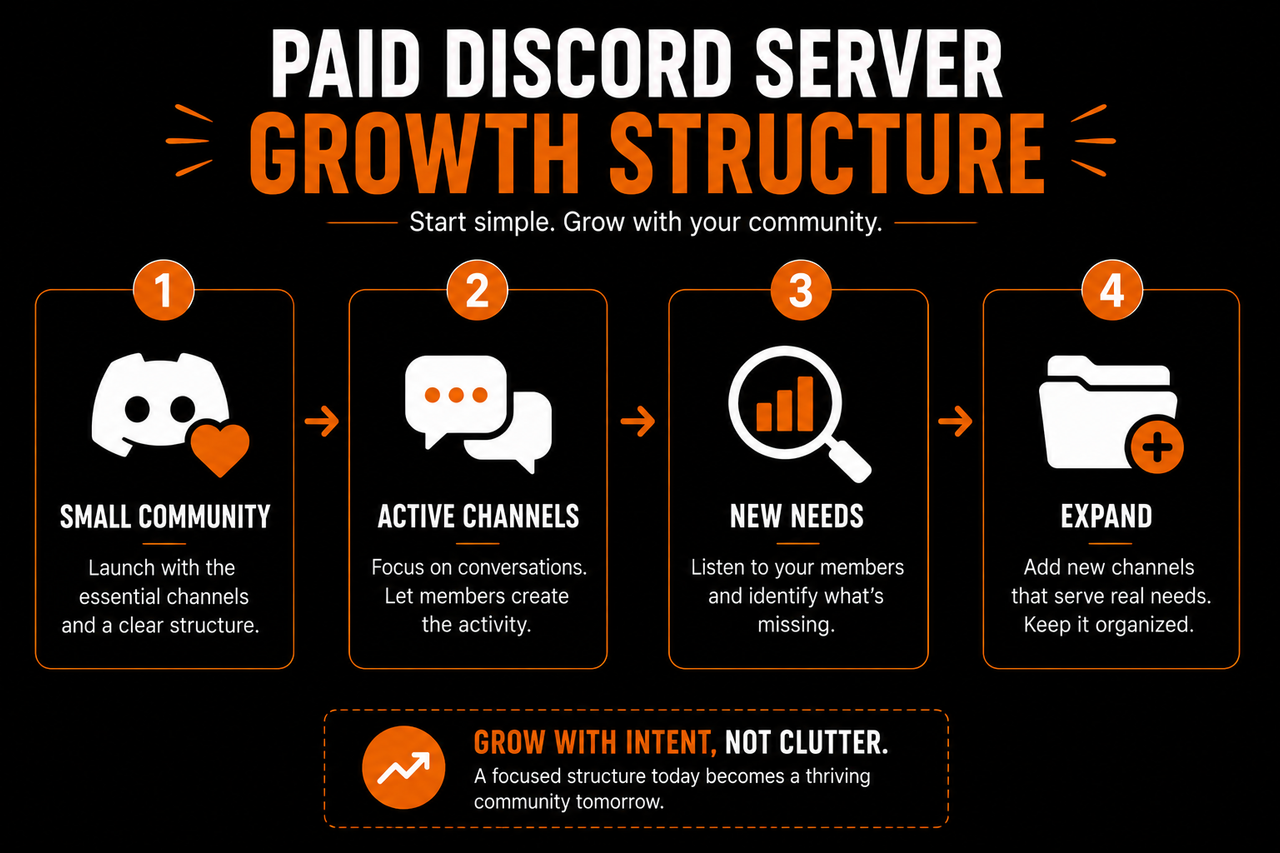
Grow Gradually, Not All at Once
Many owners build for the community they hope to have one day.
They create categories for future masterminds.
- Future courses.
- Future coaching.
- Future networking groups.
- Future regional meetups.
- Future partnerships.
Months later, many of those channels are still empty.
Instead of making the community look ambitious, they make it feel unfinished. A better approach is to let the community earn new structure. When a discussion consistently becomes busy, give it its own space.
When members repeatedly ask for a particular resource, create a dedicated area for it. When a weekly event becomes part of the community routine, organize it properly.
Growth should solve existing problems. It should not anticipate problems that may never appear.
Let Member Behavior Shape the Server
One advantage of Discord is that members naturally reveal how they want to use the community. Pay attention to recurring patterns. Perhaps members constantly ask beginner questions in the general chat. That may suggest a dedicated help channel. Maybe project showcases receive significantly more engagement than expected. That could justify giving them their own space. Perhaps networking conversations appear every single day. Now there is evidence that members genuinely want a networking area.
Instead of designing entirely from assumptions, allow real member behavior to influence future changes. Communities feel more natural when their structure reflects how members already interact rather than how the owner imagined they would.
Review Your Server Regularly
Many servers are organized once and then forgotten. Years later, channels still exist for initiatives that ended long ago.
Old announcements remain pinned. Unused voice channels occupy valuable space. Archived projects still appear alongside current ones. None of these issues seem particularly serious on their own. Together, however, they slowly make the community harder to navigate.
Scheduling a simple review every few months can prevent this. Ask questions like:
- Which channels receive consistent activity?
- Which channels are rarely used?
- Are members asking questions that suggest information is difficult to find?
- Has the onboarding journey become longer than necessary?
- Are there categories that could be simplified?
These reviews are rarely about adding more. More often, they involve removing clutter that accumulated naturally over time. Communities tend to become healthier when complexity is reduced instead of increased.
Protect the Member Experience
As communities grow, owners often become focused on helping moderators. That is understandable. Larger communities require more organization behind the scenes.
Private staff areas expand. Internal documentation grows. Moderation workflows become more sophisticated. All of that is perfectly reasonable. The mistake is allowing those operational needs to shape the public-facing experience.
Members should still experience a server that feels simple.
Behind the scenes, there may be dozens of moderation processes. From the member's perspective, joining should remain straightforward. They should still know:
- Where to start.
- Where to ask questions.
- Where conversations happen.
- Where important resources live.
Growth should increase operational sophistication without increasing member confusion.
Use Categories to Create Mental Landmarks
As servers expand, categories become increasingly important. People rarely remember the exact name of every channel. Instead, they remember locations.
- They know resources are "near the top."
- Events are "in the middle."
- General discussions happen "under Community."
Good categories act like neighborhoods within a city. Members don't memorize every building. They simply know where to go. This reduces navigation time and makes the server feel much smaller than it actually is. A community with forty well-organized channels often feels easier to navigate than one with fifteen scattered randomly across Discord.
Structure is not about reducing the number of channels.It is about making them predictable.
Avoid Rebuilding Everything
Another common mistake is completely redesigning the server every few months.
- Channels move.
- Categories disappear.
- Resources change location.
Members suddenly struggle to find information they previously knew by heart. Frequent redesigns create unnecessary friction.
Instead, think about your server like a house. Occasionally you renovate a room.
- You might add another floor.
- You repaint certain areas.
- You rarely demolish the entire building because one room became crowded.
Small, gradual improvements preserve familiarity while allowing the community to evolve. Members appreciate consistency. The less they need to relearn navigation, the more naturally they continue participating.
Structure Supports Culture
Server structure often seems like a technical decision. In reality, it shapes community culture.
- A server with visible discussion spaces encourages conversation.
- A server with prominent member showcases encourages sharing.
- A server where events are easy to discover encourages participation.
- A server where resources are organized encourages learning.
The layout quietly communicates what the community values. Members respond accordingly.
- If introductions are easy to find, people introduce themselves.
- If wins are celebrated in a dedicated space, members become more comfortable sharing progress.
- If questions consistently receive thoughtful answers, asking for help becomes normal.
Culture is created by people. Structure influences how those people interact. That is why the layout deserves just as much attention as branding, moderation, or onboarding.
Simplicity Scales Better Than Complexity
One lesson appears repeatedly across successful paid communities. The communities that continue growing smoothly are rarely the ones with the most elaborate Discord servers. They are usually the ones with the clearest ones. Members don't remember how many categories your server contained. They remember whether it was easy to use.
- Whether they found help quickly.
- Whether conversations were active.
- Whether they understood where they belonged.
That experience comes from thoughtful structure rather than sheer size. Whenever you are uncertain whether to create another channel, another category, or another section, ask yourself one question:
Does this make the community easier to use for members?
If the answer is yes, it is probably worth considering. If the answer is no—or if it simply makes the server look larger—it probably adds complexity without creating value.
The strongest Discord communities are not built around having the most channels. They are built around helping members move naturally from joining the server to becoming active participants.
Every category, every channel, and every section should contribute to that journey.
When the structure quietly guides people toward conversations, resources, relationships, and events, the server begins feeling intuitive rather than overwhelming.
That is ultimately the purpose of good Discord architecture.
Not to impress people with organization, but to remove every unnecessary obstacle between a new member and their first meaningful interaction.
What You Should Do Next
If you already run a paid Discord server, resist the urge to redesign everything overnight. IInstead, spend an hour looking at your server through the eyes of a brand-new member.
Ask yourself:
- Is it immediately obvious where someone should begin?
- Could they find the most valuable resources without asking for help?
- Are conversations concentrated in a few active spaces, or scattered across dozens of quiet channels?
- Does every channel have a clear purpose?
- Is there anything that feels unnecessary or outdated?
You will often discover that the biggest improvements come from removing complexity rather than adding more structure. If you're building a new community, start small. Create only the channels you genuinely need today. Allow member behavior to determine how the server evolves over time.
A Discord server should grow alongside the community—not ahead of it.
Remember that members are not paying for an impressive channel list. They are paying for access to people, conversations, knowledge, and opportunities. Your server structure exists to make those things easier to discover.
When members can immediately understand where to go, what to do, and how to participate, they begin finding value much faster. And when finding value becomes effortless, engagement, retention, and community growth become much easier to achieve.
The best server structure is rarely the one with the most channels. It is the one members hardly have to think about at all.